Quick start
The fastest way to get started is to include the following directly into your webpage:
<script type="module">
  import { Elena, html } from "https://unpkg.com/@elenajs/core/bundle";

  /** ░█ [ELENA]: Hello world example */
  export default class MyGreeting extends Elena(HTMLElement) {
    static tagName = "my-greeting";
    static props = ["name"];
    name = "Somebody";

    render() {
      return html`<p>Hello, ${this.name}!</p>`;
    }
  }
  MyGreeting.define();
</script><!-- Use it anywhere on the page -->
<my-greeting name="World"></my-greeting>WARNING
This relies on the unpkg CDN and is not recommended for production. For production use, install @elenajs/core locally and bundle your components with @elenajs/bundler.
Installation
To install Elena as a dependency in your project, run:
npm install @elenajs/coreyarn add @elenajs/corepnpm add @elenajs/corebun add @elenajs/coreThen import Elena in your component files:
import { Elena } from "@elenajs/core";Building your first component
There are three types of Progressive Web Components:
- Composite Components that wrap and enhance the HTML composed inside them. All of their HTML and CSS lives in the Light DOM. You could also call these HTML Web Components.
- Primitive Components that are self-contained and render their own HTML. All of their CSS lives in the Light DOM together with the base HTML required for rendering the initial state.
- Declarative Components that are a hybrid of these and utilize Declarative Shadow DOM.
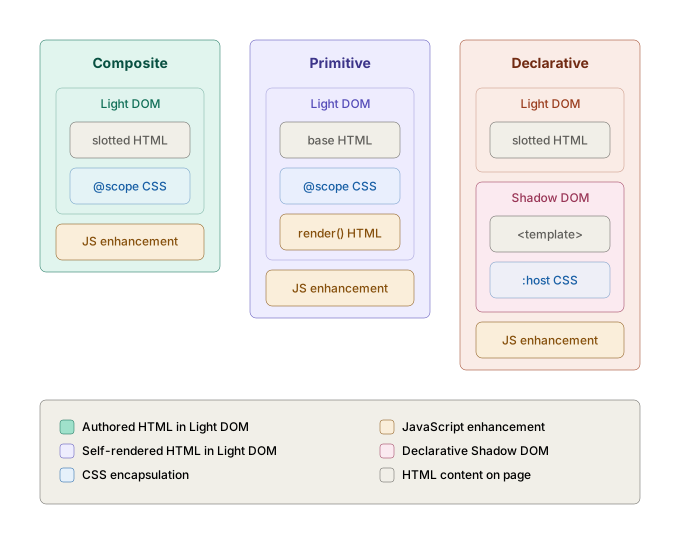
TIP
Elena doesn’t force you to think about this taxonomy. They’re all just components, and you choose how to build yours. But since Progressive Web Components is a design philosophy rather than a library feature, understanding the distinction between these approaches helps when deciding what fits your use case.
1. Composite Components
A Composite Component enhances whatever HTML is composed inside it, applying styling and behavior around it. It has no render() method and never touches its children.
import { Elena } from "@elenajs/core";

/** ░█ [ELENA]: Composite Component example */
export default class Stack extends Elena(HTMLElement) {
  static tagName = "my-stack";
  static props = ["direction"];

  direction = "column";
}

Stack.define();@scope (my-stack) {
:scope {
display: flex;
justify-content: flex-start;
align-items: flex-start;
flex-flow: column wrap;
flex-direction: column;
gap: 0.5rem;
}
:scope[direction="row"] {
flex-direction: row;
}
}Usage
<my-stack direction="row">
  <div>First</div>
  <div>Second</div>
  <div>Third</div>
</my-stack>
2. Primitive Components
A Primitive Component owns and controls its inner HTML markup. Two things to know to get started:
htmlis Elena’s tagged template function. It auto-escapes interpolated values to prevent XSS, and nestedhtmlfragments pass through without double-escaping.this.textis a built-in reactive property. Elena captures any text content placed inside the element before hydration, so you can pass text as a child node or set it as a property. Utilizing this helps to avoid layout shifts.
import { Elena, html } from "@elenajs/core";

/** ░█ [ELENA]: Primitive Component example */
export default class Button extends Elena(HTMLElement) {
  static tagName = "my-button";
  static props = ["variant"];

  variant = "default";

  render() {
    return html`
      <button class="my-button">
        ${this.text}
      </button>
    `;
  }
}

Button.define();@scope (my-button) {
:scope,
*:where(:not(img, svg):not(svg *)),
*::before,
*::after {
all: unset;
display: revert;
}
:scope {
--my-button-bg: pink;
display: inline-block;
}
:scope:not([hydrated]),
.my-button:is(button) {
background: var(--my-button-bg);
display: inline-flex;
}
:scope[variant="primary"] {
--my-button-bg: green;
}
:scope[variant="danger"] {
--my-button-bg: red;
}
}Usage
<my-button variant="primary">Save</my-button>
<my-button>Cancel</my-button>
3. Declarative Components Pre-release
A Declarative Component utilizes Declarative Shadow DOM which lets you define a shadow root directly in HTML using a <template shadowrootmode="open"> element. The browser attaches the shadow root during parsing, so the content is visible before JavaScript loads.
import { Elena } from "@elenajs/core";

/** ░█ [ELENA]: Declarative Component example */
export default class Button extends Elena(HTMLElement) {
  static tagName = "elena-button";
  static shadow = "open";
}

Button.define();<elena-button>
<template shadowrootmode="open">
<link rel="stylesheet" href="button.css" />
<button><slot></slot></button>
</template>
Click me
</elena-button>Usage
<elena-button>
  <template shadowrootmode="open">
    <link rel="stylesheet" href="button.css" />
    <button><slot></slot></button>
  </template>
  Click me
</elena-button>In practice, you have to write the <template> block by hand every time you use the component, which gets repetitive quickly unless you abstract this duplication away in your own application.
Usage with frameworks
Elena components are standard custom elements and work in any framework. Import and define your component once, then use it like any HTML element:
<script type="module" src="my-design-system"></script>

<my-stack direction="row">
  <my-button variant="primary">Save</my-button>
  <my-button>Cancel</my-button>
</my-stack>import "my-design-system";
export default function App() {
return (
<my-stack direction="row">
<my-button variant="primary">Save</my-button>
<my-button>Cancel</my-button>
</my-stack>
);
}import "my-design-system";
export default function App() {
return (
<my-stack direction="row">
<my-button variant="primary">Save</my-button>
<my-button>Cancel</my-button>
</my-stack>
);
}<script setup>
import "my-design-system";
</script>
<template>
<my-stack direction="row">
<my-button variant="primary">Save</my-button>
<my-button>Cancel</my-button>
</my-stack>
</template><script>
import "my-design-system";
</script>
<my-stack direction="row">
<my-button variant="primary">Save</my-button>
<my-button>Cancel</my-button>
</my-stack>import "my-design-system";
@Component({
selector: "app-root",
template: `
<my-stack direction="row">
<my-button variant="primary" text="Save"></my-button>
<my-button text="Cancel"></my-button>
</my-stack>
`,
})
export class AppComponent {}For more, see the Framework Integration examples.
Bundling components Pre-release
@elenajs/bundler is the build tool for Elena component libraries. It bundles JavaScript and TypeScript source files, minifies styles, generates a Custom Elements Manifest, and produces TypeScript declarations.
npm install --save-dev @elenajs/bundleryarn add --dev @elenajs/bundlerpnpm add --save-dev @elenajs/bundlerbun add --dev @elenajs/bundlerRun the build:
npx elena buildBundler configuration
Create an elena.config.mjs at the root of your package:
/**
 * ░█ [ELENA]: Bundler configuration
 *
 * @type {import("@elenajs/bundler").ElenaConfig}
 */
export default {
  // Source directory scanned for .js/.ts entry files and .css files.
  input: "src",

  // Rollup output options.
  output: {
    dir: "dist",
    format: "esm",
    sourcemap: true,
  },

  // Entry for the single-file bundle. Set to false to disable.
  bundle: "src/index.js",

  // Additional Rollup plugins appended after Elena’s built-in set.
  // plugins: [],

  // Custom Elements Manifest options. Set to false to skip entirely.
  // analyze: {
  //   plugins: [],
  // },

  // Browserslist targets for transpilation. Enables syntax transforms
  // (e.g. class fields, optional chaining) to widen browser support.
  // target: ["chrome 71", "firefox 69", "safari 12.1"],

  // Custom Terser minifier options, merged with the defaults.
  // terser: { ecma: 2020, module: true },
};
For more, see the Component Libraries guide.
Command Line Interface Pre-release
@elenajs/cli scaffolds new Elena components interactively. It generates JavaScript, TypeScript, or single-file HTML source files with all Elena patterns pre-configured.
npm install --save-dev @elenajs/cliyarn add --dev @elenajs/clipnpm add --save-dev @elenajs/clibun add --dev @elenajs/cliRun without arguments to step through all options:
npx elena-createOr pass a component name to skip the name prompt:
npx elena-create my-button
npx elena-create my-date-picker
For more, see the CLI documentation.
Next steps
- View the Live Examples to see Elena in action.
- Browse our FAQ for frequently asked questions.
- Read the Component API reference to learn about props, events, and lifecycle hooks.
- Learn how to build a full Component Library.
- Explore Framework Integration examples for React, Vue, Angular, Next.js and more.
- Try Elena in the Playground.